Checking hotels' commitments to partner beverage brands.
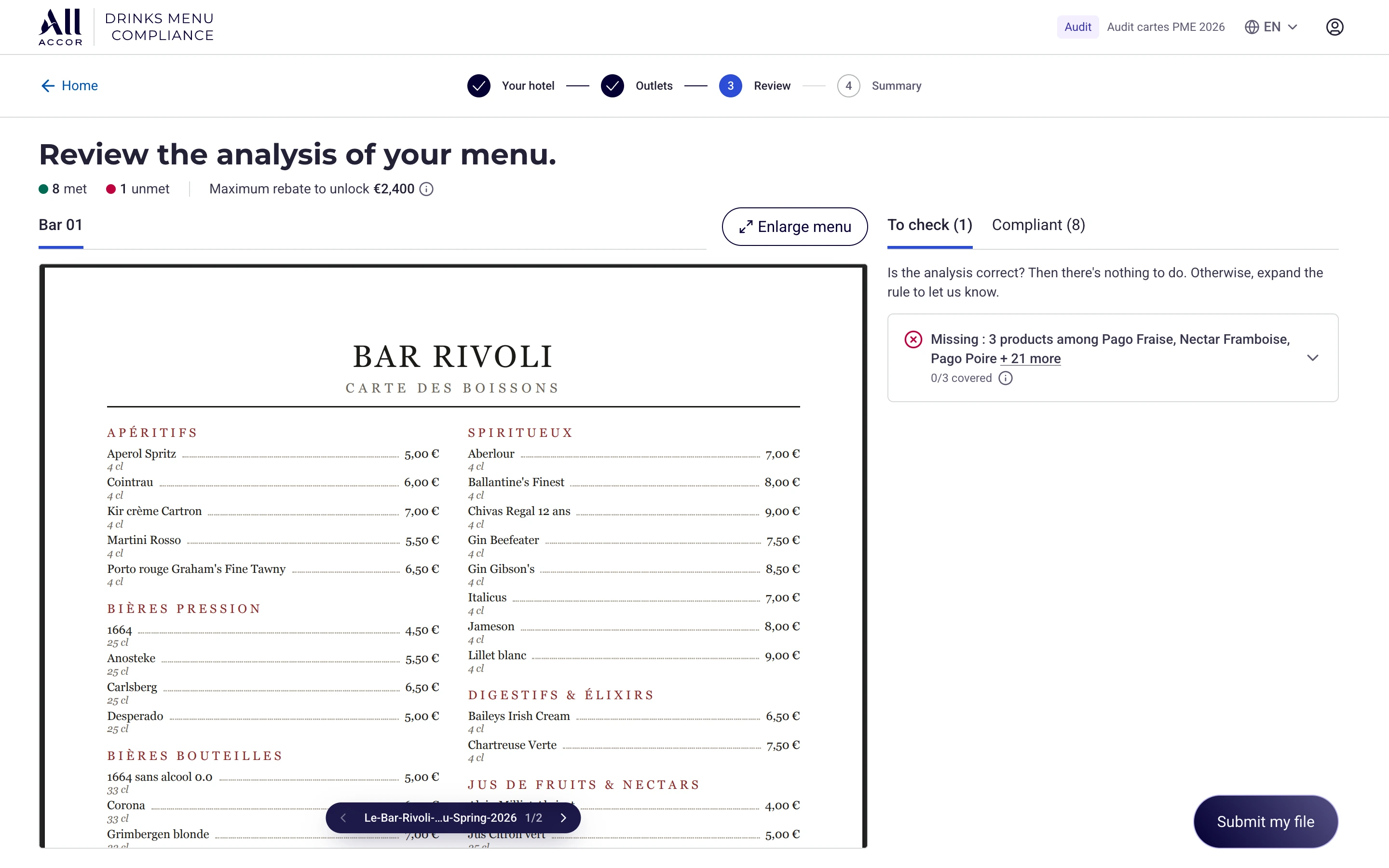
Accor is building a tool to automatically check the menus of its bars and restaurants. I designed the flows that let hotels check the analysis, report an error or request an exemption, then let the Accor team review those requests. The work became a working React prototype whose front end was taken over by the client's developer.
The starting point
Hotels must offer certain partner-brand drinks under rules defined by Accor. An operator checks the menus of more than a thousand hotels each year using an Excel file. The team wants to automate this check; its product manager has already built a prototype. The brief: challenge the UX and apply the group’s design system. Scoping revealed two uses: an annual check for hotels and daily case reviews for the back office.
I designed these flows with the operator, business teams and hoteliers while development was starting on the client’s side. From 20 to 30 July, seven hoteliers commented on the prototype aloud, screen by screen, while I ran the demonstration. These prototype findings changed the pre-analysis checkboxes, outlet types and the visibility of expandable rows.
Correct the analysis and explain what is missing
A rule may require two products while the hotel declares only one. The hotel challenges the analysis for the product it has and explains why the other is missing. I separated those responses: the comment concerns the declared product; the justification concerns the missing one.
My first form used a single field whose purpose changed with the declaration. The business review challenged it: its label changed under the cursor and no longer referred to the product the user had just selected.
Two segments, two ways to review
In economy hotels, doing nothing remains a valid response when the analysis is correct. In luxury hotels, a response is required for every rule. Hoteliers’ requests reinforced this distinction: they wanted to confirm when a product really was absent. I kept two stable labels for responding to the analysis, regardless of the rule type.
Before analysis: make the irreversible step clear
The operator requested a single attempt so hotels could not change their menus after seeing the result. She wrote the warning. Hoteliers then prompted a change from typing a confirmation word to two checkboxes: the content has been reviewed and the user understands there is no way back.
Resolve each request, with the right explanation
Accepting a correction and granting an exemption are different decisions. I separated their actions and reasons: rejecting a challenge requires an explanation, while granting an exemption leaves the reason optional. The case cannot be closed while any request still awaits a decision.
The reviewer must be able to explain a rejection to the hotel’s contact. Making a reason mandatory everywhere would also require writing when granting an exemption. The form therefore follows the decision being made.
What a rejection must not change
Rejecting a challenge does not remove what the analysis had already found. The detected products remain the baseline: rejecting a declaration does not erase a product recognised on the menu. Dedicated tests check that the verdict agrees with the rule details.
Include hotels that have not submitted anything
I had designed the home screen around cases awaiting review. The operator also needs to answer questions about the entire hotel population, including hotels that have not submitted anything. I rebuilt the home screen around brands: submissions, compliance, pending cases and missing submissions remain visible together.
“Actually, I need to see everything.” During the review, the operator reframed the need: track all hotels to answer questions from properties, franchise groups and management.
The rules must also cover the hotel population
The hotel population provides the denominator for progress. A campaign whose rulebook left a brand without rules would include hotels that could not be assessed. The prototype therefore blocks its creation and identifies what is missing. A dedicated test covers this safeguard; the video above shows tracking by brand.
Delivery and observed outcomes
The client’s developer took over the frontend and is working on the backend and real data. The operator also presented the prototype to management herself.
The deliverable includes the flows, the design system adapted to React and the data contract expected by the frontend.
« Honestly it's really smooth, it's really great because I don't have much time to spend on the front end, I pick up everything. It really gives you a prototype that is exactly the same thing as the final application. »
The repository and checks handed over
React 19, TypeScript and Vite, a demo mode and an API contract for the backend team. The handed-over repository contains 555 test cases in 100 files. They can be rerun with a command; their number alone does not demonstrate the quality of every flow.
Twenty-six primitives were reimplemented from the design system’s Figma specifications. End-of-mission audits document corrections and remaining issues. Changes requested in the group’s library remain outside my verified scope.
The limits
Working prototype without a backend or real authentication, with simulated analysis. The developer takes over the interface and must implement the business logic on the server.
What I would do differently
I would involve hoteliers earlier. They joined in the fifth week and changed screens after the developer had started. Meeting them a week earlier would have brought that feedback ahead of the handover.